 by
by First, I would like to begin with the best wishes for the year 2019! Let it be a great Microsoft technology year! This is also my first blog for this year and this time I want to write about the hybrid Azure AD join scenario. Almost everyone knows this scenario, but with this blog, I’m going more about the details of joining. This can be useful for troubleshooting.
Alrighty then, let’s begin
What is Hybrid Azure AD join?
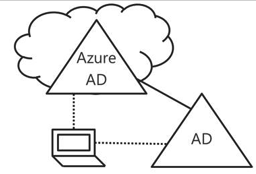
Not everyone knows this scenario, the hybrid Azure AD join. So, let me explain this in a nutshell what Hybrid Azure AD join does: The hybrid is a feature in Azure AD which allows you to use the on-premises and Azure AD environment at the same time. This is also called Hybrid Identity. With Windows 10, you can join the device in Azure AD and in Active Directory on-premises. In some scenarios, the device has to join both Active Directories for some reasons. To combine this, you got a hybrid scenario. Now, for the device, you have to configure some settings before the device can join them both. If you accomplished that, the computer will be joined automatically with Azure AD after the device has joined the on-premises Active Directory successfully. This is the hybrid Azure AD join. This means that the user who logged on that specific device can access data on-premises and Office 365 with the same credentials. The credentials are synced from the on-premises Active Directory with Azure Active Directory.

Hybrid scenario
What is needed to enable hybrid in Active Directory and Azure Active Directory?
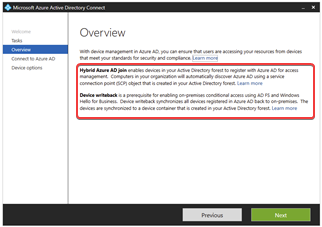
To enable the hybrid Azure AD join scenario, you have to configure Azure AD connect. With that application, you can enable the hybrid join scenario. What does the application do when you enable the hybrid Azure AD to join? Azure AD connect will add an SCP into Active Directory on-prem. SCP stands for Service Connection Point and will be used to discover your Azure AD tenant information. With that information, the device can register in Azure AD automatically.
More information about the configuration, follow this link: https://docs.microsoft.com/en-us/azure/active-directory/devices/hybrid-azuread-join-managed-domains
To automatically the process of joining, you have to enable a GPO setting. If you have got an SCCM/ConfigMgr environment, you can also use SCCM to join the computer automatically. For more information, read this link: https://docs.microsoft.com/en-us/azure/active-directory/devices/hybrid-azuread-join-control
What happens if the computer joins the Active Directory?
When the device joins the on-prem Active Directory, the device will get the GPO settings from the domain controller which enables a scheduled task on the computer. (the same for SCCM, if you have enabled the automatically join option in Client settings)
This is one of the events you see. The computer has found a GPO setting with value 1 (enable).

After that, you will see this. This will enable the scheduled task:

This scheduled task will be used for joining Azure AD and will run automatically based on two different triggers. The scheduled task is located at \Microsoft\Windows\Workplace Join.
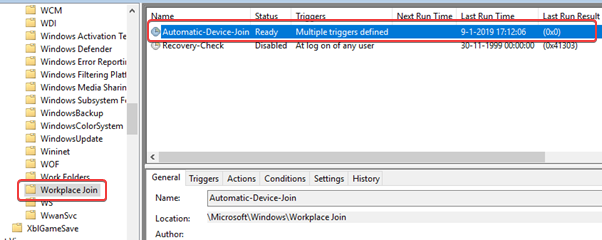
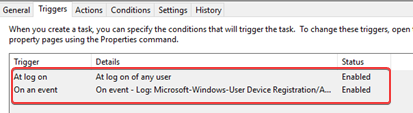
The scheduled tasks have two triggers. One when the user logs in and the other is when Event ID 4096 is showing up in the User-Device-Registration/Admin event log.
Before the device can register himself in Azure AD, the computer object has to be synchronized from the on-prem AD to Azure AD. Without that computer object, the device cannot register himself in Azure AD. You will see this event ID in the Use-Device-Registration with error code 0x801c03f2.
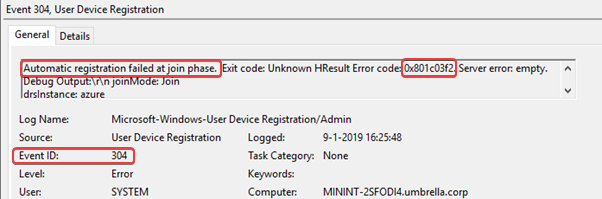
This means that the object does not exist in Azure AD. To resolve this error, you have to wait on the next sync or you have to manual start the sync by running this command Start-ADSyncSyncCycle -PolicyType Delta on the Azure AD connect server.
User Certificate
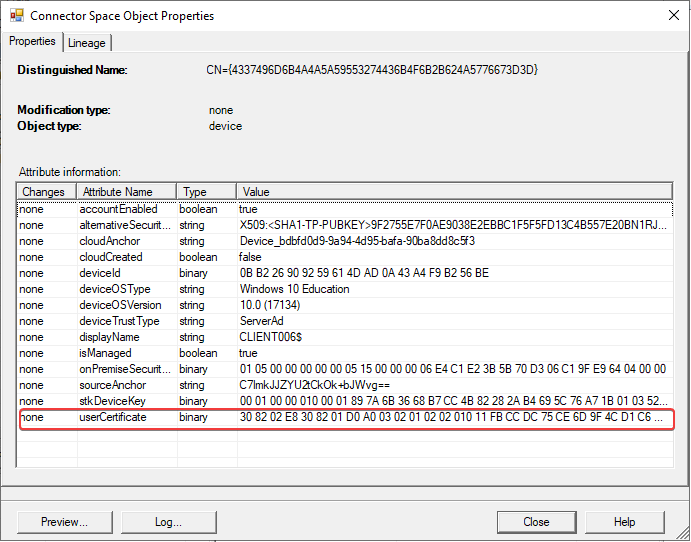
It is also possible that the computer object will not synchronize with Azure AD because of a missing attribute. Only computer object with a self-sign user certificate will be synchronized with Azure AD. How does this work? There is a scheduled task which manages the process of generating user certificate. When the task starts, the process verifies the SCP. The device finds the SCP and decided to try for a hybrid domain join. Then the devices verify the Azure Device Registration service to see if it can join. If this is successful it generates a user certificate and populates the UserCertificate attribute in Active Directory on-premises.
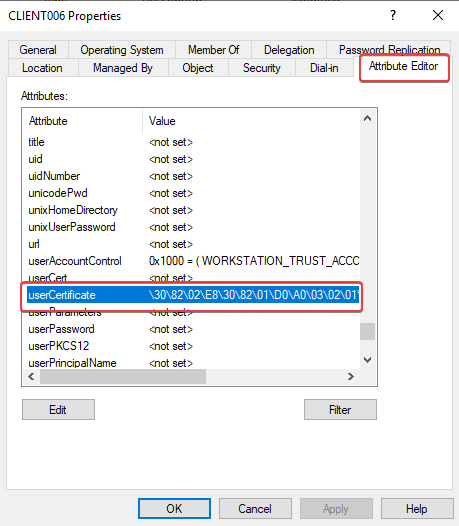
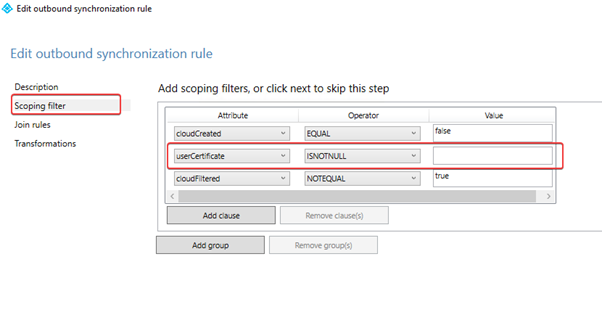
The userCertificate attribute must not be empty. If the computer has generated a user certificate, the attribute will be populated with the thumbprint of that user certificate in Active Directory. In the next schedule, the device will be synchronized to Azure AD. See below for the default sync rules.
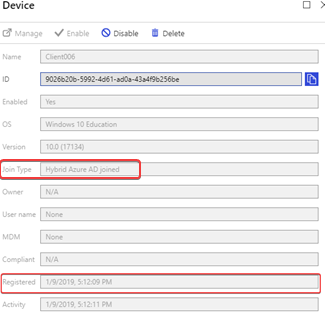
You see in the audit logs of Azure Active Directory -> Devices that the computer object has been synchronized. The device ClIENT006 has been added to the Azure AD.

At that moment, the device can register with Azure AD device registration service. You see these following Event IDs:

As a finished result you will get this event ID:

The timestamp is equal to the one in the audit log in Azure Active Directory.

And you can also run the DSREGCMD /Status command on the device for verifying the hybrid domain join.

Final
This is how the process of device registration works. Without a user certificate, the computer will not synchronize with Azure AD. The computer must be synchronized with Azure AD before the computer can register with Azure AD. Without that, you don’t have a hybrid Azure AD joined device.
The process looks like this:
After a domain joins with the on-prem Active Directory, the device tries the following:
- The device finds the SCP and decided to try a hybrid domain join.
- It verifies Azure Device Registration service to see if it can join. If this is successful it generates a user certificate and populates the UserCertificate attribute in on-prem Active Directory.
- The following step is to try to hybrid join, but it fails because the computer object has not been synchronized with Azure AD.
- In the next schedule for synchronizing with Azure AD. The computer object has been synchronized because of the populated UserCertificate attribute.
- Meanwhile, the device keeps periodically trying to hybrid domain join. If the computer object exists in Azure AD and the user certificate matches with the one what was generated, the hybrid domain join will succeed. Now you got a hybrid Azure AD join device in your environment.
This is it. Thanks for reading my blog post about hybrid Azure AD join. If you have any questions or comments about hybrid Azure AD join or maybe Microsoft Intune related, don’t hesitate to contact me by email or by posting a comment here below. I am also active on social media and some community forums, like Technet forum, Yammer, and Techcommunity.
Good luck! Take care now, bye bye then…
 ALBERTNEEF.TECH
When you use adfs (fed auth) the ou containing the win10 devices does not have to be synced, but then make sure to block registration via gpo or orherwise all your servers (2016) are hybrid joined 🙂 Also the user logging in has to have an AAD P license.
Further great blog.
Thanks for the comment, mate 🙂 That’s correct. Federated (ADFS config) uses the device registration service (DRS) on-premises. This scenario is based on PTA or PHS configurations. Forget to note this one in my blogpost.
Thanks Albert, great article. It’s possible for you to describe the registration process with AD FS? I haven’t found anything clear in the official documentation. Thanks
thanks Albert, great article.
Can you describe how the registration process change with AD FS?
I have not found anything on the official documentiation. Thanks again.
Thank for the comment, Mike! I can describe it to you. It is almost the same but in ADFS you have to use Device Registration Services in ADFS. The Azure AD Connect does configure it automatically for you if you choose for a hybrid with ADFS: https://docs.microsoft.com/en-us/azure/active-directory/devices/hybrid-azuread-join-federated-domains
The rest of this part is the same, even for troubleshooting.
Hi Albert, I read how to configure with AD FS and I had no problems, Microsoft documentation was clear 😛
I just want to correctly understand how the device registration process works (last part of your article). It’s the same with AD FS (with the user certificate, the sync of attribute…)
Thanks again. Mike
Ah great!… The registration with Azure AD is the same as with ADFS, but the client will report to on-prem instead with the DRS in Azure AD. If the device gets an answer from the DRS in ADFS then the device will get a user certificate and the computer object of that specific device will be updated with the ID of that user certificate. After that, the computer object will be synchronized with Azure AD.
thanks for your quick reply
Hi, Albert.
Thanks for article. My computer is Hybrid Azure AD joined. I`ve checked it. When I try DSREGCMD /Status shows AzureAdJoined : NO
I am the new one in Azure Tech, so may be I missed something. Waiting new posts. Thanks a lot.
Thanks for the comment, Alexandr. For troubleshooting the hybrid domain join, you should check the event log User-Device-Registration. Did you enable Hybrid option in Azure AD Connect already? Without that the devices can’t find your Azure tenant for a join.
Hi Albert, nice article. i’m glad there are others using this hybrid Azure. I have a quick question that is not clear in many articles from Microsoft. When I enable hybrid device registration. does it automatically create the GPO? to sync devices? If I do not link or enforce GPO…will devices automatically join Azure or sync the objects?
Hi Jeff, thanks for your comment. No, you have to set the GPO manually by enabeling Device Registration. This setting will automatically register the device in Azure AD. So, without GPO no automatically device Registration with Azure AD and thus no Hybrid Azure AD joined device. Sync is another thing which you have to setup it Azure AD Connect. It is important that the device AD object is synced with Azure AD. Without that -while you have enabled Device Registration in GPO- the device will not registered in Azure AD.
It’s great post about hybrid azure ad join process on manged domain.
I will translate your cool post into Japanese.
Thanks for the comment, Shinya! Please, go ahead, no problem at all 🙂
Thank you for your quick reply.
I will do it!
I wrote a Japanese blog on Qiita.
In particular, I have referred to the description of the user Certificate attribute.
Thank you so much.
https://qiita.com/Shinya-Yamaguchi/items/73016fcdb5beeaefa5ba
Great! I just tweeted your blog 🙂 Thank you for reading the blog.
Hi Albert, thank you for the nice and helpful article. Anyway, my team just tested Hybrid Azure AD join and experience this situation where only one user that can join the devices to Hybrid Azure AD while other users cannot do it. I checked the Device settings in AAD in Azure Portal and find no specific configuration that mention only certain user can do the Hybrid Azure AD Join. Can you please advise in which area I should check to make sure that other users can also do Hybrid Azure AD Join? Thanks in advance.
Hi Septia, thanks for your comment! I think that the device object does not exist in Azure AD. Did you check if the device is synchronized with Azure AD? Without this object, the device cannot be joined/registered in Azure AD. To verify, you should see the device in Devices via Azure Active Directory as a hybrid Azure AD device but hasn’t registered yet (registered box is empty). This is good. It is up to the user for the registration with Azure AD. The registration/hybrid Azure AD will be initialized when the user logs in.
The device object should also be in the correct OU in the on-premises Active Directory. The OU is the one which is synced with Azure AD.
Hello Albert,
Nice article! I wish I saw it earlier. It would have saved me some troubleshooting time. In my environment, a dozen computers are missing the userCertificate attribute. Not sure why. To confirm this was the reason why they couldn’t be synchronized in AAD, I manually populate the userCertificate attribute and the sync worked. However, the AAD device registration status was “pending”. Do you know the name of the scheduled task that manages the process of generating user certificate?
Thanks
Hi Lucien, thanks for your comment and visiting my blog.
The one which is responsible for enrolling/creating the certificate is UserTask in CertificateServiceClient. Look at the trigger “On an Event”.

Good luck!
Thanks Albert!
I found that UserTask ran successfully while KeyPreGenTask failed with the error message “TPM: 1.2: The TPM is attempting to execute a command only available when in FIPS mode”. This affects only the Dell E6440 laptop and seems to be related to TPM , although BitLocker is working just fine. I read some articles that recommend turning off TPM then turning it back on after the device joins AAD. I’ll give it a try. Thank you again for your guidance.
Lucien
Ah great, nice! No problem at all and let me known! Take care…
Hi Albert, We are trying to implement Hybrid Azure AD join, can I just clarify a couple of points :
1) Hybrid join is only one way, an on prem AD joined device joining AAD
2) The group policy required as mentioned here : https://docs.microsoft.com/en-us/azure/active-directory/devices/hybrid-azuread-join-control
Do you need to use ADFS – the page above suggests you don’t, does that mean the GPO itself is sufficient?
3) Hybrid option (with sync) is required for the above scheduled tasks etc to function?
Thanks
Arov
Hi Arov, thanks for the comment.
1) Yes indeed.. Fist the device must be on-prem AD joined and then it will joining (registering) the Azure AD.
2) The policy is required. This policy will automate the joining process for Azure AD.
3) You have to enable the Hybrid Azure AD in Azure AD Connect. if you enable the Hybrid Azure AD then it will create an SCP in Active Directory which redirects the endpoint to your Azure AD tenant for registering/joining.
ADFS is not necessary if you already using Password Sync or Pass-through authentication. To realize Hybrid Azure AD you must enable this in Azure AD Connect. So, you have to customize Azure AD Connect for that. Very simple and easy step to do that. Good luck!
Thanks for response Albert, I believe we will still need ADFS as we are looking at implementing Windows Hello.
No problem at all, Arov. For Hybrid Windows Hello with Hybrid Azure AD joined certificate trust deployment needs indeed an ADFS for that. It’s a requirement for this scenario. https://docs.microsoft.com/en-us/windows/security/identity-protection/hello-for-business/hello-hybrid-cert-trust-prereqs#federation
Great, thanks Albert
Hi Albert, thank you for an interesting article! My question to you is about the the primary owner of the computer object when you are in the hybrid azure AD join mode and computers are
On prem AD and in Azure AD, is there any articles that describes this.
Hi Amders, thanks for the comment. Unfortunately I don’t understand your question. Is it not clear who is the primary owner of that object when the computer joins the on-prem AD and Azure AD? The user who is logged on and the registration of the hybrid process has initiated, will become the primary owner of that device.
Thank you for this breakdown! Very useful!
Hi Albert,
Really good article helped to break down this process. I have two questions:
1. In your described process step 1 is “device finds the SCP” does this actually happen only when user login to machine, or this can be configured to happen before user login to machine? Because in my case this only happen when user login to device, then device lookup for SCP and activate WorkPlace Join task.
My GPO “Enable automatic MDM enrollment using default Azure AD credentials” is configured to use “User Credential”.
2. Is this process same for AutoPilot devices? I mean does AutoPilot device need to have assigned mentidoned above for automatic enrollment, or AutoPilot manages this for us?
HI Nenadvelickovic, thanks for your comment.
1) It happens indeed when the user logs in. Then the process will start and joined the device in Azure AD.
2) No, that is not necessary. Autopilot handles the hybrid join. For hybrid join, you have to use a connector for joining the device in the on-premises active directory. Totally another process that I have described in this blog 🙂
Good luck!
Is there any way where we can convert adjure joined to hybrid join from azure or do it from the internet ( not from lan/ dc environment).
Hello!
So I confirmed that SCP is configured using AD Connect app, but my computers are not generating usercert attributes still. I reading that it might be due to the connection to Azure AD not communicating?
Hi Josh, that is possible and your AD connect has to sync the computersobjects with Azure AAD.
Hello Albert. Thanks for detailed explanation. I am trying to search if what is the best way to complete a pending Hybrid Azure AD joined laptops. Some of the staff laptops have not been backed to the office where the on-prem AD is located.
1. Is it possible to force the registration to Azure while outside the AD network?
2. Or can I manually generate a userCertificate then manually populate it to Azure somehow?
3. Do I need VPN so it can complete the hybrid join, in case the laptop cannot really go back to the office where the AD is?
Thanks
Hi ST, thanks for your comment.. Short answers:
1) no, that is not possible. You have a direct link with your domain controllers.
2) that is also not possible due to legit of the certificate. The machine and the domain controller must make the certificate and must be the owner of that one.
3) that is possible. You have check your traffic, maybe some traffic can be block due the firewall. But it is possible to complete the hybrid join with VPN.